
 Quality Management



















 IT Service Management



 Project Management



 Agile Management




 Web Development



 Cloud Computing


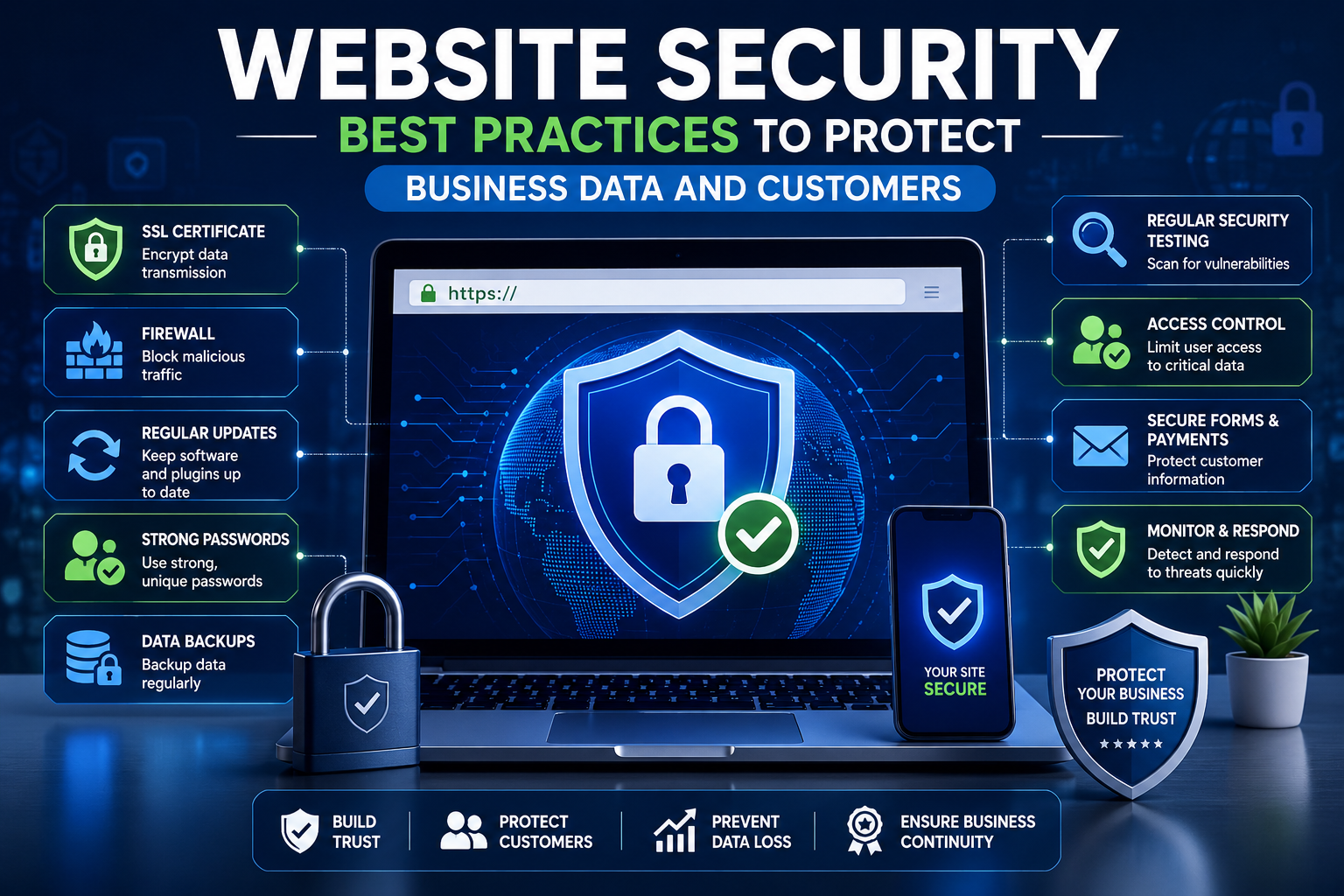
In today's digital age, where online presence is paramount, ensuring the security of your website is crucial. As businesses increasingly rely on web applications for operations and customer interactions, website security best practices have become a focal point for safeguarding sensitive data and maintaining customer trust. This blog will delve into essential measures you can implement to enhance web application security, ensure secure website development, and protect against cyber threats.
Understanding the Importance of Website Security
Website security is not just a technical requirement; it’s a critical aspect of business strategy. With rising cyber threats, every organization, especially those operating in India, must prioritize the protection of their digital assets. A single data breach can lead to significant financial losses, harm your brand's reputation, and erode customer trust. Therefore, implementing effective website protection strategies is vital for every business owner.
Website Security Best Practices
1. Use HTTPS
One of the fundamental website security best practices is to ensure that your website uses HTTPS instead of HTTP. HTTPS encrypts the data exchanged between the user's browser and your server, making it difficult for cybercriminals to intercept sensitive information. This is especially important for e-commerce websites where customers share personal and payment information.
2. Regular Software Updates
Keeping your website's software, plugins, and themes updated is crucial for maintaining web application security. Developers regularly release updates to patch security vulnerabilities. Failing to update can leave your website open to exploitations by hackers. Establish a routine for checking and applying updates to ensure your website remains secure.
3. Strong Password Policies
Implementing strong password policies is essential in preventing unauthorized access. Encourage users to create complex passwords that include a mix of letters, numbers, and special characters. Additionally, consider implementing two-factor authentication (2FA) for an extra layer of security. This requires users to verify their identity through a secondary method, providing enhanced protection against cyber threats.
4. Use a Web Application Firewall (WAF)
A Web Application Firewall acts as a barrier between your website and potential threats. It monitors and filters incoming traffic, blocking malicious requests before they reach your server. Investing in a reputable WAF can significantly reduce the risk of attacks such as SQL injection, cross-site scripting (XSS), and distributed denial-of-service (DDoS).
5. Regular Backups
Regularly backing up your website is an often-overlooked aspect of website protection. In the event of a cyber attack or data loss, having recent backups can save you from significant operational disruptions. Store your backups in a secure location and test them periodically to ensure their integrity and reliability.
6. Secure Your Hosting Environment
The security of your website is closely tied to the reliability of your hosting provider. Choose a hosting service that prioritizes security, offers features like firewalls, malware scanning, and DDoS protection. Additionally, ensure that your hosting environment is configured correctly to minimize vulnerabilities.
7. Implement Content Security Policy (CSP)
A Content Security Policy is a security feature that helps prevent various types of attacks, such as cross-site scripting (XSS) and data injection. By defining which sources of content are trustworthy, you can limit the risk of malicious scripts running on your website. Implementing a CSP is a proactive step towards enhancing web application security.
8. Monitor and Audit Regularly
Continuous monitoring and regular audits of your website can help you identify vulnerabilities before they can be exploited. Use security tools to scan for malware, check for outdated software, and monitor user activity for any suspicious behavior. Regular audits can also help ensure compliance with data protection regulations.
Common Cyber Security Threats to Websites
Understanding the types of cyber threats your website may face is essential for implementing effective security measures. Here are some common cyber security threats to be aware of:
1. Malware
Malware refers to malicious software designed to disrupt, damage, or gain unauthorized access to computer systems. It can infect your website and compromise data security, leading to severe consequences.
2. Phishing Attacks
Phishing attacks often involve tricking users into providing sensitive information like usernames and passwords by masquerading as a trustworthy entity. Educating your customers about these threats can help them recognize and avoid falling victim.
3. DDoS Attacks
Distributed Denial-of-Service (DDoS) attacks aim to overwhelm your website with an influx of traffic, rendering it unavailable to legitimate users. Implementing protective measures like WAF can help mitigate the impact of DDoS attacks.
4. Data Breaches
Data breaches occur when unauthorized individuals gain access to sensitive data. This can lead to identity theft, legal repercussions, and loss of customer trust. Adhering to security best practices is crucial to preventing data breaches.
Conclusion
In an increasingly digital landscape, prioritizing website security is no longer optional; it’s a necessity. By following the website security best practices outlined in this blog, you can significantly enhance your website's protection against cyber threats. Remember that security is an ongoing process. Stay informed about the latest security trends and continue to adapt your strategies accordingly.
FAQs about Website Security Best Practices
Q1: What are website security best practices for small businesses?
A1: Small businesses should focus on implementing HTTPS, regular software updates, strong password policies, and regular backups to protect their websites effectively.
Q2: How often should I update my website's software?
A2: It is advisable to check for updates at least once a month and apply critical updates immediately to ensure your website remains secure.
Q3: Can using a free hosting service affect my website's security?
A3: Yes, free hosting services often lack robust security features, making your website more vulnerable to attacks. Investing in a reputable hosting provider is crucial for maintaining security.
Q4: What is the role of a Web Application Firewall?
A4: A Web Application Firewall (WAF) protects your website by filtering and monitoring HTTP traffic between the web application and the Internet, preventing various types of attacks.
Q5: How can I educate my customers about cyber security threats?
A5: You can create informative content, such as blog posts or newsletters, and share tips on recognizing phishing attempts and maintaining their online safety.
Call to Action
Don’t wait until it’s too late! Start implementing these website security best practices today to protect your business data and customers. If you need assistance with secure website development or enhancing your cyber security for websites, contact us for expert advice tailored to your business needs!




Leave a Comment